The Steward™ platform · Case management
A name and a date. Everything else writes itself.
Case management for any program that moves a cohort of people through a timeline — built in a 180-day residential recovery program, and just as at home in a daycare, a school, a re-entry program or a 90-day new-hire onboarding. Every person on one line: day in program, phase, this week’s focus, next milestone, status — tracked for 78 weeks, 546 days, as standard, and for a full four-year span if your program needs it. The reporting your board, your funders or your licensing body ask for comes straight out of it.
 StewardFlowDashboardRosterMonth 1Months 4–6Post-gradBudget
 StewardScribe™ ·
Why it’s different
Most programs keep the case file in one place and rebuild the numbers for the board in another. StewardFlow keeps one roster. The day count, the phase, the milestone and the exit status live on each person’s row — and the dashboards, the phase chart and the outcomes are computed from that row, every time, without anyone retyping anything. Resident, child, student, new hire, participant: the roster does not care what you call them.
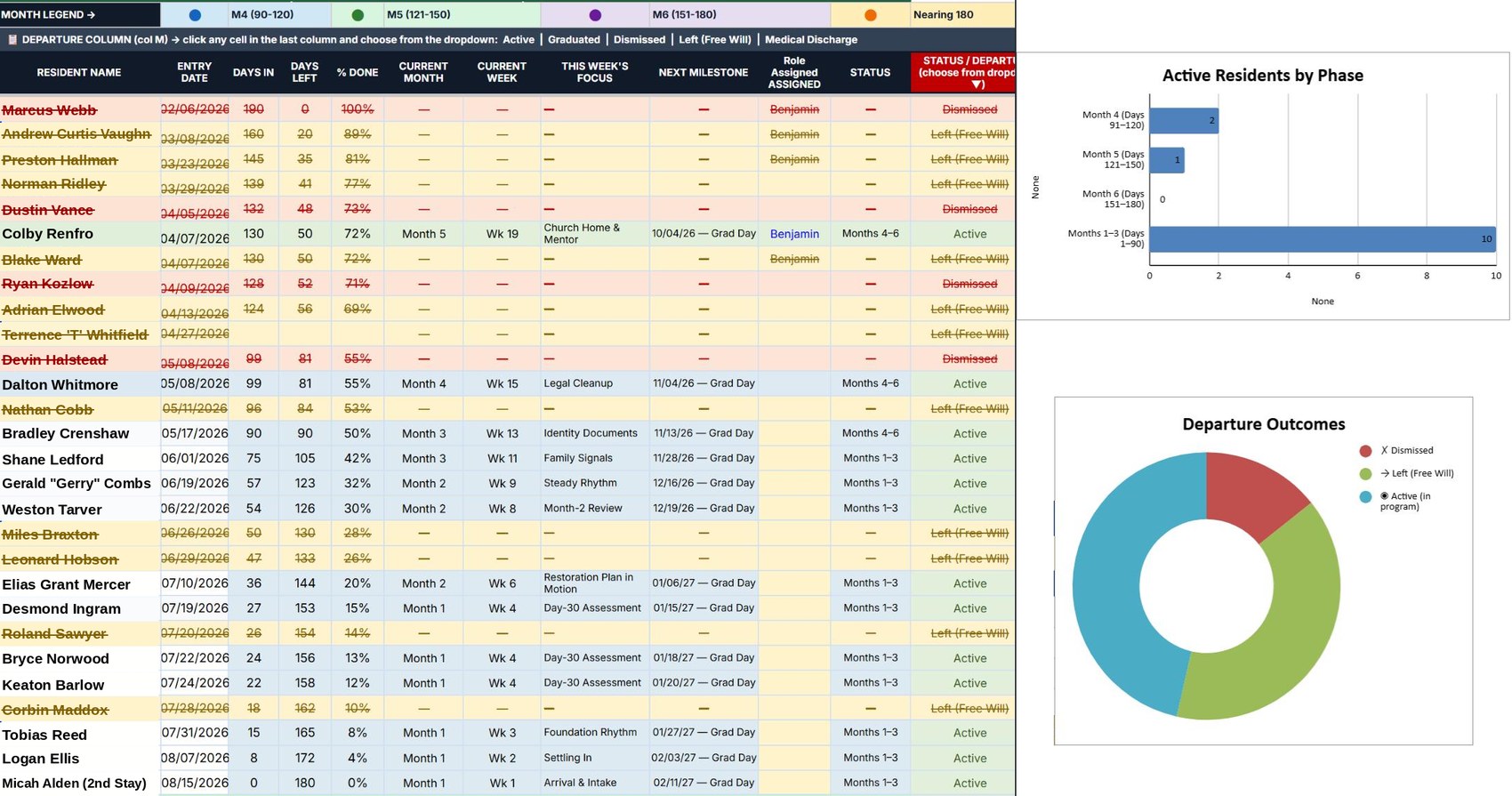
Type a name and the date of day one. Days in, days left, percent done, current month and week, next milestone, graduation and follow-up dates, status — all of it fills itself in from those two cells and stays current every day. The case manager sees the whole house on one screen.
Entry day counts as Day 1 and graduation lands where your program says it does, every time; the roster keeps counting through the follow-ups that come after — 78 weeks, 546 days, as standard. Need a school career or an apprenticeship? The same roster runs a full four years. The arithmetic is held by the tool, not by the person who happens to be on shift.
A resident who leaves or is dismissed is not blanked out. The row stays, the day count freezes, the status is marked — so the outcomes report is honest and the history is intact.
Phase 1, Months 1–3, Months 4–6, post-graduation evaluation, scoring and a success tracker, each on its own tab and each fed from the same roster.
Wage, hours and pay frequency in; take-home out. Then the allocations, in a fixed order the sheet holds for you: tithe first, emergency savings, the move-out fund, legal and restitution, child support and family — and what remains is what the resident lives on. Monthly and per pay period, side by side.
Google Sheets or Excel — no new login, no training week. Case notes, weekly focus and follow-ups come in from StewardScribe™ by voice, dated and filed into the right row, so nobody sits down to type the file.
How it works
The resident, student or person joining the cohort, and the day they started. That is the whole entry.
Day count, days left, percent done, phase, current month and week, next milestone, graduation date, the 3-, 6- and 12-month follow-up dates out to day 546, the phase chart, the outcomes report and the board numbers — computed by the workbook and kept current every day, by automation.
The parts a formula can’t know — this week’s focus, what was said in the meeting, the case note — are spoken, not typed. Talk into StewardScribe™ on the walk back to the office and the dated note files into the person’s row and their running case file on its own.
Two cells typed. Everything else — every date, every count, every chart, every note — arrives on its own, for every person, all 546 days.
What’s inside

Who it’s for
Where it was built: men’s and women’s houses on a fixed-length program, where the day count and the phase are the backbone of the week.
Every child on one line — enrollment date, room, age band, developmental milestones, the assessments licensing asks for, and who has aged up or moved on. The state report comes out of the roster.
A class, a grade or an academy cohort with scored milestones, attendance signals and a defined graduation — the same roster whether the program is nine weeks or nine months.
A structured 90-day onboarding with scored milestones: day one, week one, thirty, sixty, ninety. Who is on track, who needs a conversation, who cleared probation.
Prison re-entry, court diversion, IOPs and peer-led houses — programs whose funding lives or dies on outcomes tracking.
Any program with an entry date, milestones and a defined exit: apprenticeships, workforce cohorts, housing-first placements.
New-member classes, mentoring tracks, a year-long discipleship group — who started, where they are, who finished.
A dashboard that is always current, because it is the same sheet the staff work in. Completion rates, headcount by phase, outcomes — ready when the report is due.
That job is gone.
Privacy & ownership
No vendor database. The workbook is a file you own, in the Drive you already control.
Nothing leaves your account. Sharing is by your Drive permissions, person by person.
Each house gets its own copy. A new program starts from the template in minutes.
If the internet is down the case file is still open.
Part of the Steward™ family
StewardFlow™ is one of the tools built for ministries and small organizations that keep their own infrastructure — it runs in your accounts, and it talks to the rest of the family.
FAQ
It is a workbook with more than two and a half thousand formulas, built and tested for a specific kind of program, running in production with zero formula errors. It is a spreadsheet the way a good ledger is a spreadsheet.
78 weeks — 546 days — is the standard window: a 180-day program plus the follow-ups that show whether it held. If you need longer, the same roster runs a full four years: a school career, an apprenticeship, a multi-year mentoring track. Shorter works too — a 90-day onboarding, a twelve-week course. The day counts, phases and graduation math are parameters.
If you track a group of people from an entry date through milestones to an exit, yes. Daycares, schools, employers, re-entry programs and churches all run on the same roster logic; only the labels and the milestones change, and those are set up with you.
The row stays with the status marked and the day count frozen. Nothing is deleted, and the outcomes report counts it correctly.
Case notes dictated in StewardScribe™ can file to it automatically, and StewardPulse™ intake data can seed the roster. Both are optional.
It is set up with you: your program’s phases, milestones and terminology, your staff trained in an afternoon.
One roster. Every answer.

 StewardConnect™
 StewardPulse™
 StewardPlanner™